 Notepad – Notes & Reminder
Your brain has too many tabs open. Close a few.
Write it, color it, check it off, lock it away. A simple notepad that remembers things so you don’t have to.

Everything a note needs.
Nothing it doesn’t.
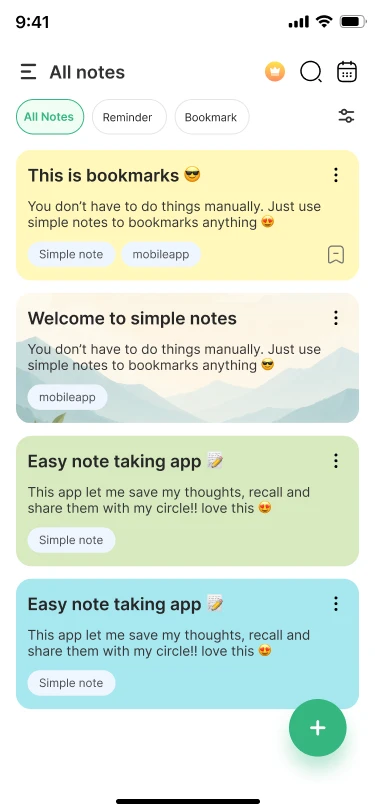
These cards look just like your notes inside the app. That’s on purpose.
Color-coded notes 🎨
Yellow for ideas, green for groceries, blue for that thing you swore you’d remember. Spot the right note before you even read it.
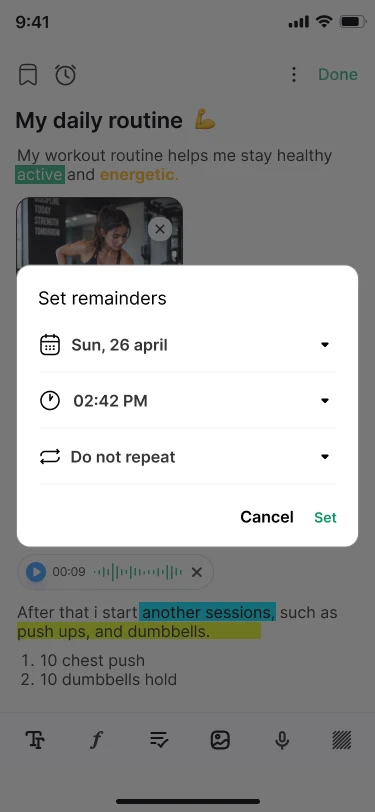
Reminders that remind ⏰
Pick a date, a time, and how often it repeats. Your note taps you on the shoulder right when it matters.
Checklists ✅
Tick it, strike it, move on. Grocery runs and to-do lists finally get the satisfying ending they deserve.
Lock private notes 🔒
Some notes are just for you. Lock them and they stay hidden on the list until you unlock them.
Calendar view 📅
Tap a date, see what you wrote that day. No more scrolling forever to find last Tuesday’s idea.
Write it your way ✍️
Bold, highlight, headings, text colors and lists. Add a photo or a voice note when typing feels like too much.
Take a look inside.
No tutorial needed. If you’ve ever used paper, you already know how this works.


Small app. Big relief.
Made for everyday phones
Designed to feel quick and light, even if your phone isn’t the newest one around.
Free to start
Download it and start writing. No sign-up, no setup, no tour.
Ads-free if you want
Ads keep the app free. If they bug you, the premium plan makes them disappear.
Questions, answered.
The short version of what people ask us most.
Is the app free?
Yes. Notepad is free to download and use. It shows ads to stay free, and you can buy the premium plan inside the app to remove them.
Why didn’t my reminder show up?
Allow notifications for the app, turn off battery optimization for it, and allow background activity in your phone’s settings. Some phones also need auto-start turned on.
Can I lock a note?
Yes. Locked notes stay hidden on your list and open only after you unlock them.
Can I add photos or voice to a note?
Yes. Use the toolbar at the bottom of the editor to add an image or record a voice note right inside your note.
Note to self: download this.
Takes less time than finding a pen. Your future self will thank you.